Writing Algorithms
Charting
Charts
Charts contain a collection of series, which display data on the chart. To add a chart to an algorithm, create a Chart object and then call the AddChartadd_chart method.
var chart = new Chart("<chartName>");
AddChart(chart);
chart = Chart("<chartName>")
self.add_chart(chart)
The Chart constructor expects a name argument. The following chart names are reserved:
- Assets Sales Volume
- Exposure
- Portfolio Margin
Series
A chart series displays data on the chart. To add a series to a chart, create a Series object and then call the AddSeriesadd_series method.
var series = new Series("<seriesName>");
chart.AddSeries(series);
series = Series("<seriesName>")
chart.add_series(series)
Arguments
There are several other headers for the Series constructor.
Series(name, type)
Series(name, type, index)
Series(name, type, index, unit)
Series(name, type, unit)
Series(name, type, unit, color)
Series(name, type, unit, color, symbol)
The following table describes the constructor arguments:
| Argument | Data Type | Description |
|---|---|---|
name | stringstr | Name of the series |
type | SeriesType | Type of the series |
index | int | Index position on the chart of the series |
unit | stringstr | Unit for the series axis |
color | Color | Color of the series |
symbol | ScatterMarkerSymbol | Symbol for the marker in a scatter plot series |
The default Series is a line chart with a "$" unit on index 0.
Names
The Series constructor expects a name argument. If you add a series to one of the default charts, some series names may be reserved. The following table shows the reserved series name for the default charts:
| Chart Name | Reserved Series Names |
|---|---|
| Strategy Equity | Equity, Return |
| Capacity | Strategy Capacity |
| Drawdown | Equity Drawdown |
| Benchmark | Benchmark |
| Portfolio Turnover | Portfolio Turnover |
Types
The SeriesType enumeration has the following members:
A Line series connects plotted values with a continuous line. This is the default series type.
chart.AddSeries(new Series("EMA", SeriesType.Line, "$", Color.Orange)); chart.add_series(Series("EMA", SeriesType.LINE, "$", Color.ORANGE))
A Scatter series plots individual data points without connecting lines. Use the ScatterMarkerSymbol parameter to set the marker shape.
chart.AddSeries(new Series("Signal", SeriesType.Scatter, "$", Color.Green, ScatterMarkerSymbol.Triangle)); chart.add_series(Series("Signal", SeriesType.SCATTER, "$", Color.GREEN, ScatterMarkerSymbol.TRIANGLE))
A Candle series displays OHLC data as candlesticks. Use the CandlestickSeries helper class and plot a TradeBar to populate all four values.
chart.AddSeries(new CandlestickSeries("SPY", "$")); chart.add_series(CandlestickSeries("SPY", "$"))
A Bar series draws vertical bars for each plotted value, which is useful for volume or count data.
chart.AddSeries(new Series("Volume", SeriesType.Bar, "", Color.Gray)); chart.add_series(Series("Volume", SeriesType.BAR, "", Color.GRAY))
To create a StackedArea chart, add multiple series to the same chart. Each series contributes an area band that stacks on top of the others.
chart.AddSeries(new Series("Stocks", SeriesType.StackedArea, "%"));
chart.AddSeries(new Series("Bonds", SeriesType.StackedArea, "%"));
chart.add_series(Series("Stocks", SeriesType.STACKED_AREA, "%"))
chart.add_series(Series("Bonds", SeriesType.STACKED_AREA, "%"))
To create a Treemap chart, add multiple series to the same chart. Each series becomes a tile and its plotted value determines the tile size.
chart.AddSeries(new Series("SPY", SeriesType.Treemap, "$"));
chart.AddSeries(new Series("AAPL", SeriesType.Treemap, "$"));
chart.add_series(Series("SPY", SeriesType.TREEMAP, "$"))
chart.add_series(Series("AAPL", SeriesType.TREEMAP, "$"))
For a full example that demonstrates all series types, see Examples.
Index
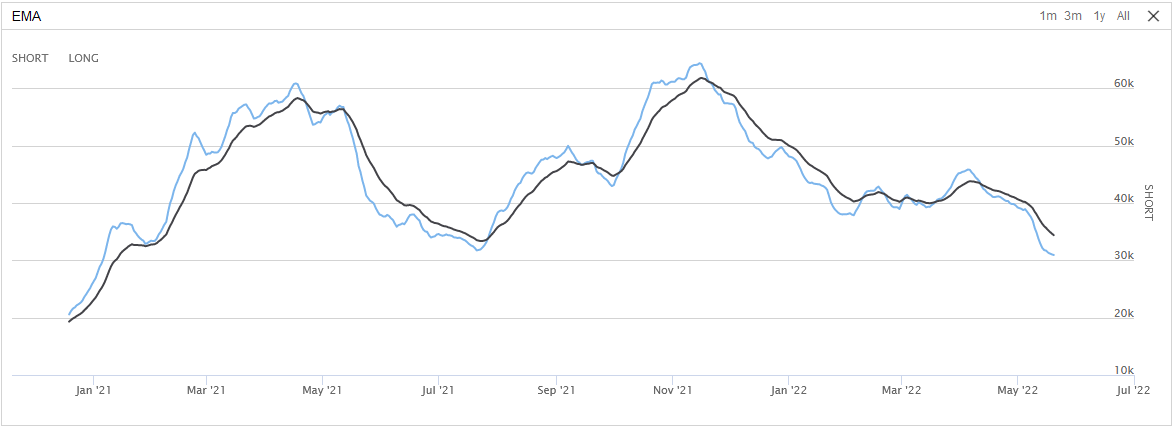
The series index refers to its position in the chart. If all the series are at index 0, they lay on top of each other. If each series has its own index, each series will be separate on the chart. The following image shows an EMA cross chart with both EMA series set to the same index:
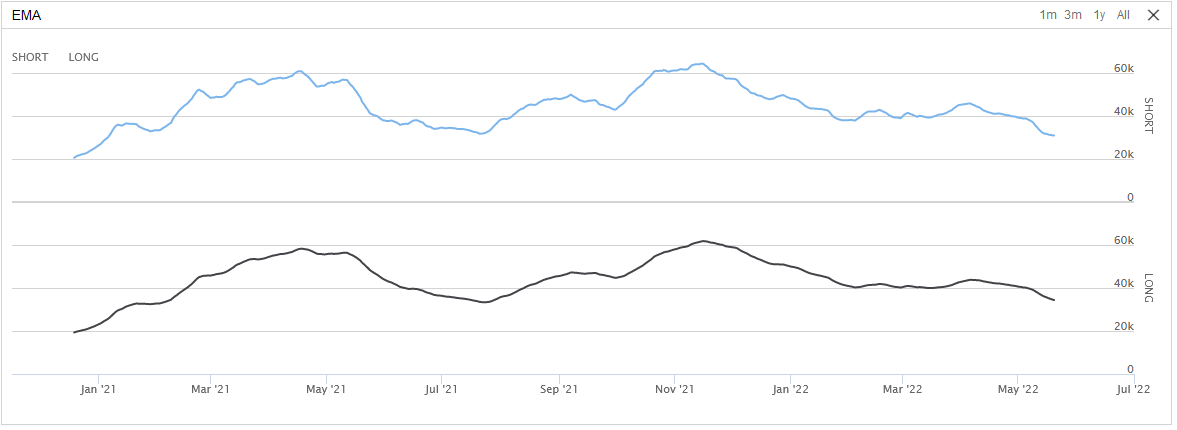
The following image shows the same EMA series, but with the short EMA on index 0 and the long EMA on index 1:
Colors
To view the available Color options, see the Color Struct Properties in the .NET documentation.
Scatter Marker Symbols
The ScatterMarkerSymbol enumeration has the following members:
Candlestick Series
A chart candlestick series displays candlesticks on the chart. To add a candlestick series to a chart, create a CandlestickSeries object and then call the AddSeriesadd_series method.
var candlestickSeries = new CandlestickSeries("<seriesName>");
chart.AddSeries(candlestickSeries);
candlestick_series = CandlestickSeries("<seriesName>")
chart.add_series(candlestick_series)
There are several other headers for the CandlestickSeries constructor.
CandlestickSeries(name)
CandlestickSeries(name, index)
CandlestickSeries(name, index, unit)
CandlestickSeries(name, unit)
The following table describes the constructor arguments:
| Argument | Data Type | Description |
|---|---|---|
name | stringstr | Name of the series |
index | int | Index position on the chart of the series |
unit | stringstr | Unit for the series axis |
The default CandlestickSeries has 0 index and "$" unit.
Plot Series
To add a data point to a chart series, call the Plotplot method. If you haven't already created a chart and series with the names you pass to the Plotplot method, the chart and/or series is automatically created.
Plot("<chartName>", "<seriesName>", value); self.plot("<chartName>", "<seriesName>", value)
The value argument can be an integer or decimal number. If the chart is a time series, the value is added to the chart using the algorithm time as the x-coordinate.
To plot the current value of indicators, call the Plotplot method. The method accepts up to four indicators.
// In Initialize
var symbol = AddEquity("SPY");
var smaShort = SMA(symbol, 10);
var smaLong = SMA(symbol, 20);

// In OnData
Plot("<chartName>", smaShort, smaLong)
# In Initialize
symbol = self.add_equity("SPY")
sma_short = self.sma(symbol, 10)
sma_long = self.sma(symbol, 20)
# In OnData
self.plot("<chartName>", sma_short, sma_long)
To plot all of the values of some indicators, in the Initializeinitialize method, call the PlotIndicatorplot_indicator method. The method plots each indicator value as the indicator updates. The method accepts up to four indicators.
var symbol = AddEquity("SPY");
var smaShort = SMA(symbol, 10);
var smaLong = SMA(symbol, 20);
PlotIndicator("<chartName>", smaShort, smaLong)
symbol = self.add_equity("SPY")
sma_short = self.sma(symbol, 10)
sma_long = self.sma(symbol, 20)
self.plot_indicator("<chartName>", sma_short, sma_long)
Plot Candlestick
To add a sample of open, high, low, and close values to a candlestick series, call the Plotplot method with the data points. If you haven't already created a chart and series with the names you pass to the Plotplot method, the chart and/or series is automatically created.
Plot("<chartName>", "<seriesName>", open, high, low, close); self.plot("<chartName>", "<seriesName>", open, high, low, close)
The open, high, low, and close arguments can be an integer for decimal number. If the chart is a time series, the values are added to the chart using the algorithm time as the x-coordinate.
To plot the current trade bar, call the Plotplot method with a TradeBar argument in the OnDataon_data method.
// In Initialize
var equity = AddEquity("SPY");
var forex = AddForex("EURUSD");

// In OnData
var tradeBar = slice.Bars["SPY"];
var collapsed = slice.QuoteBars["EURUSD"].Collapse();   // Collapses QuoteBar into TradeBar object

Plot("<chartName1>", "<seriesName>", tradeBar)
Plot("<chartName2>", "<seriesName>", collapsed)
# In Initialize
equity = self.add_equity("SPY")
forex = self.add_forex("EURUSD")
# In OnData
trade_bar = slice.bars["SPY"];
collapsed = slice.quote_bars["EURUSD"].collapse() # Collapses QuoteBar into TradeBar object
self.plot("<chartName>", "<seriesName>", trade_bar)
self.plot("<chartName>", "<seriesName>", collapsed)
To plot consolidated bars, call the Plotplot method with a TradeBar argument in the consolidation handler.
// In Initialize
var equity = AddEquity("SPY");
Consolidate(equity.Symbol, TimeSpan.FromMinutes(10), ConsolidationHandler);

// Define the consolidation handler
void ConsolidationHandler(TradeBar consolidatedBar)
{
    Plot("<chartName>", "<seriesName>", consolidatedBar)
}
# In Initialize
equity = self.add_equity("SPY")
self.consolidate(equity.symbol, timedelta(minutes=10), self._consolidation_handler)
# Define the consolidation handler
def _consolidation_handler(self, consolidated_bar: TradeBar) -> None:
self.plot("<chartName>", "<seriesName>", consolidated_bar)
Plot Asset Data
Asset plots display the trade prices of an asset and the following order events you have for the asset:
| Order Event | Icon |
|---|---|
| Submissions | Gray circle |
| Updates | Blue circle |
| Cancellations | Gray square |
| Fills and partial fills | Green (buys) or red (sells) arrows |
The following image shows an example asset plot for AAPL:
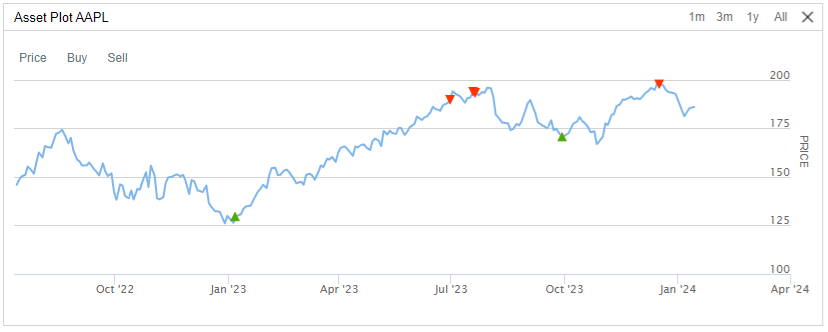
The order submission icons aren't visible by default.
For more information about these charts, including how to view them in QC Cloud, see Asset Plots for backtests or live trading.
View Charts
The following table describes where you can access your charts, depending on how to deploy your algorithms:
| Location | Algorithm Lab Algorithms | CLI Cloud Algorithms | CLI Local Algorithms |
|---|---|---|---|
| Backtest results page |  | | |
| Live results page | | | |
| /backtests/read endpoint | | | |
| /live/read endpoint | | | |
| ReadBacktest method | | | |
| ReadLiveAlgorithm method | | | |
| Local JSON file in your <projectName> / backtests / <timestamp> or <projectName> / live / <timestamp> directory | | |
Quotas
When you run backtests, you must stay within the plotting quotas to avoid errors.
Cloud Quotas
Intensive charting requires hundreds of megabytes of data, which is too much to stream online or display in a web browser. The number of series and the number of data points per series you can plot depends on your organization tier. The following table shows the quotas:
| Tier | Max Series | Max Data Points per Series |
|---|---|---|
| Free | 10 | 4,000 |
| Quant Researcher | 10 | 8,000 |
| Team | 25 | 16,000 |
| Trading Firm | 25 | 32,000 |
| Institution | 100 | 96,000 |
If you exceed the series quota, your algorithm stops executing and the following message displays:
If you exceed the data points per series quota, the following message displays:
If your plotting needs exceed the preceding quotas, create the plots in the Research Environment instead.
Local Quotas
If you execute local backtests, the charting quotas are set by the maximum-chart-series and maximum-data-points-per-chart-series configuration settings.
Examples
The following example demonstrates the Line, Scatter, Candle, Bar, StackedArea, and Treemap series types. The algorithm trades a three-asset portfolio and plots EMA crossover signals, candlestick prices, volume bars, portfolio allocation as a stacked area, and sales volume as a treemap.
public class AllSeriesTypesAlgorithm : QCAlgorithm
{
    private Symbol[] _symbols;
    private Dictionary<Symbol, ExponentialMovingAverage> _emaFast = new();
    private Dictionary<Symbol, ExponentialMovingAverage> _emaSlow = new();

    public override void Initialize()
    {
        SetStartDate(2024, 1, 1);
        SetEndDate(2024, 12, 31);
        SetCash(100000);
        Settings.AutomaticIndicatorWarmUp = true;

        var tickers = new[] { "AAPL", "MSFT", "GOOG" };
        _symbols = new Symbol[tickers.Length];
        for (var i = 0; i < tickers.Length; i++)
        {
            _symbols[i] = AddEquity(tickers[i], Resolution.Daily).Symbol;
            _emaFast[_symbols[i]] = EMA(_symbols[i], 10);
            _emaSlow[_symbols[i]] = EMA(_symbols[i], 50);
        }

        // Line and Scatter chart: EMA values with crossover markers.
        var priceChart = new Chart("EMA Crossover");
        AddChart(priceChart);
        priceChart.AddSeries(new Series("EMA Fast", SeriesType.Line, "$", Color.Orange));
        priceChart.AddSeries(new Series("EMA Slow", SeriesType.Line, "$", Color.Blue));
        priceChart.AddSeries(new Series("Cross Up", SeriesType.Scatter, "$",
            Color.Green, ScatterMarkerSymbol.Triangle));
        priceChart.AddSeries(new Series("Cross Down", SeriesType.Scatter, "$",
            Color.Red, ScatterMarkerSymbol.TriangleDown));

        // Bar chart: daily volume.
        var volumeChart = new Chart("Volume");
        AddChart(volumeChart);
        volumeChart.AddSeries(new Series("Volume", SeriesType.Bar, "", Color.Gray));

        // Candlestick chart: daily OHLC for the first symbol.
        var candleChart = new Chart("Candlestick");
        AddChart(candleChart);
        candleChart.AddSeries(new CandlestickSeries(_symbols[0].Value, "$"));

        // Stacked area chart: portfolio allocation by asset over time.
        var allocationChart = new Chart("Allocation");
        AddChart(allocationChart);
        foreach (var symbol in _symbols)
        {
            allocationChart.AddSeries(new Series(symbol.Value, SeriesType.StackedArea, "%"));
        }

        // Treemap chart: total sales volume per asset.
        var treemapChart = new Chart("Sales Volume");
        AddChart(treemapChart);
        foreach (var symbol in _symbols)
        {
            treemapChart.AddSeries(new Series(symbol.Value, SeriesType.Treemap, "$"));
        }

    }

    public override void OnData(Slice slice)
    {
        // Trade on EMA crossovers for the first symbol.
        var symbol = _symbols[0];
        if (!_emaFast[symbol].IsReady) return;

        if (_emaFast[symbol] > _emaSlow[symbol] &&
            _emaFast[symbol][1] < _emaSlow[symbol][1])
        {
            SetHoldings(symbol, 0.4m);
            SetHoldings(_symbols[1], 0.3m);
            SetHoldings(_symbols[2], 0.3m);
        }
        else if (_emaFast[symbol] < _emaSlow[symbol] &&
            _emaFast[symbol][1] > _emaSlow[symbol][1])
        {
            Liquidate();
        }
    }

    public override void OnEndOfDay(Symbol symbol)
    {
        if (symbol != _symbols[0]) return;

        // Plot EMA line and scatter crossover markers.
        Plot("EMA Crossover", "EMA Fast", _emaFast[symbol]);
        Plot("EMA Crossover", "EMA Slow", _emaSlow[symbol]);
        if (_emaFast[symbol].IsReady && _emaFast[symbol][1] != 0)
        {
            if (_emaFast[symbol] > _emaSlow[symbol] &&
                _emaFast[symbol][1] < _emaSlow[symbol][1])
                Plot("EMA Crossover", "Cross Up", Securities[symbol].Price);
            else if (_emaFast[symbol] < _emaSlow[symbol] &&
                _emaFast[symbol][1] > _emaSlow[symbol][1])
                Plot("EMA Crossover", "Cross Down", Securities[symbol].Price);
        }

        // Plot candlestick and volume bar.
        var data = (TradeBar)Securities[symbol].GetLastData();
        if (data != null)
        {
            Plot("Candlestick", symbol.Value, data);
            Plot("Volume", "Volume", data.Volume);
        }

        // Plot allocation and treemap.
        var totalValue = Portfolio.TotalPortfolioValue;
        if (totalValue > 0)
        {
            foreach (var s in _symbols)
            {
                var weight = 100m * Portfolio[s].HoldingsValue / totalValue;
                Plot("Allocation", s.Value, weight);
                Plot("Sales Volume", s.Value, Portfolio[s].TotalSaleVolume);
            }
        }
    }
}
class AllSeriesTypesAlgorithm(QCAlgorithm):
def initialize(self) -> None:
self.set_start_date(2024, 1, 1)
self.set_end_date(2024, 12, 31)
self.set_cash(100000)
self.settings.automatic_indicator_warm_up = True
tickers = ["AAPL", "MSFT", "GOOG"]
self._symbols = []
self._ema_fast = {}
self._ema_slow = {}
for ticker in tickers:
symbol = self.add_equity(ticker, Resolution.DAILY).symbol
self._symbols.append(symbol)
self._ema_fast[symbol] = self.ema(symbol, 10)
self._ema_slow[symbol] = self.ema(symbol, 50)
# Line and Scatter chart: EMA values with crossover markers.
price_chart = Chart("EMA Crossover")
self.add_chart(price_chart)
price_chart.add_series(Series("EMA Fast", SeriesType.LINE, "$", Color.ORANGE))
price_chart.add_series(Series("EMA Slow", SeriesType.LINE, "$", Color.BLUE))
price_chart.add_series(Series("Cross Up", SeriesType.SCATTER, "$",
Color.GREEN, ScatterMarkerSymbol.TRIANGLE))
price_chart.add_series(Series("Cross Down", SeriesType.SCATTER, "$",
Color.RED, ScatterMarkerSymbol.TRIANGLE_DOWN))
# Bar chart: daily volume.
volume_chart = Chart("Volume")
self.add_chart(volume_chart)
volume_chart.add_series(Series("Volume", SeriesType.BAR, "", Color.GRAY))
# Candlestick chart: daily OHLC for the first symbol.
candle_chart = Chart("Candlestick")
self.add_chart(candle_chart)
candle_chart.add_series(CandlestickSeries(self._symbols[0].value, "$"))
# Stacked area chart: portfolio allocation by asset over time.
allocation_chart = Chart("Allocation")
self.add_chart(allocation_chart)
for symbol in self._symbols:
allocation_chart.add_series(Series(symbol.value, SeriesType.STACKED_AREA, "%"))
# Treemap chart: total sales volume per asset.
treemap_chart = Chart("Sales Volume")
self.add_chart(treemap_chart)
for symbol in self._symbols:
treemap_chart.add_series(Series(symbol.value, SeriesType.TREEMAP, "$"))
def on_data(self, slice: Slice) -> None:
# Trade on EMA crossovers for the first symbol.
symbol = self._symbols[0]
if not self._ema_fast[symbol].is_ready:
return
if (self._ema_fast[symbol].current.value > self._ema_slow[symbol].current.value and
self._ema_fast[symbol][1] < self._ema_slow[symbol][1]):
self.set_holdings(symbol, 0.4)
self.set_holdings(self._symbols[1], 0.3)
self.set_holdings(self._symbols[2], 0.3)
elif (self._ema_fast[symbol].current.value < self._ema_slow[symbol].current.value and
self._ema_fast[symbol][1] > self._ema_slow[symbol][1]):
self.liquidate()
def on_end_of_day(self, symbol: Symbol) -> None:
if symbol != self._symbols[0]:
return
# Plot EMA line and scatter crossover markers.
self.plot("EMA Crossover", "EMA Fast", self._ema_fast[symbol].current.value)
self.plot("EMA Crossover", "EMA Slow", self._ema_slow[symbol].current.value)
if self._ema_fast[symbol].is_ready and self._ema_fast[symbol][1] != 0:
if (self._ema_fast[symbol].current.value > self._ema_slow[symbol].current.value and
self._ema_fast[symbol][1] < self._ema_slow[symbol][1]):
self.plot("EMA Crossover", "Cross Up", self.securities[symbol].price)
elif (self._ema_fast[symbol].current.value < self._ema_slow[symbol].current.value and
self._ema_fast[symbol][1] > self._ema_slow[symbol][1]):
self.plot("EMA Crossover", "Cross Down", self.securities[symbol].price)
# Plot candlestick and volume bar.
data = self.securities[symbol].get_last_data()
if data:
self.plot("Candlestick", symbol.value, data)
self.plot("Volume", "Volume", data.volume)
# Plot allocation and treemap.
total_value = self.portfolio.total_portfolio_value
if total_value > 0:
for s in self._symbols:
weight = 100 * self.portfolio[s].holdings_value / total_value
self.plot("Allocation", s.value, weight)
self.plot("Sales Volume", s.value, self.portfolio[s].total_sale_volume)
You can also see our Videos. You can also get in touch with us via Discord.
Did you find this page helpful?
